Design
How to draw a QR code by hand that actually scans
A hand-drawn QR code scans just like a printed one, as long as every square is in the right place. The trick is to copy a real code rather than invent one, and to keep it small.
By Armaghan Abdul Qayyum · Updated · 6 min read
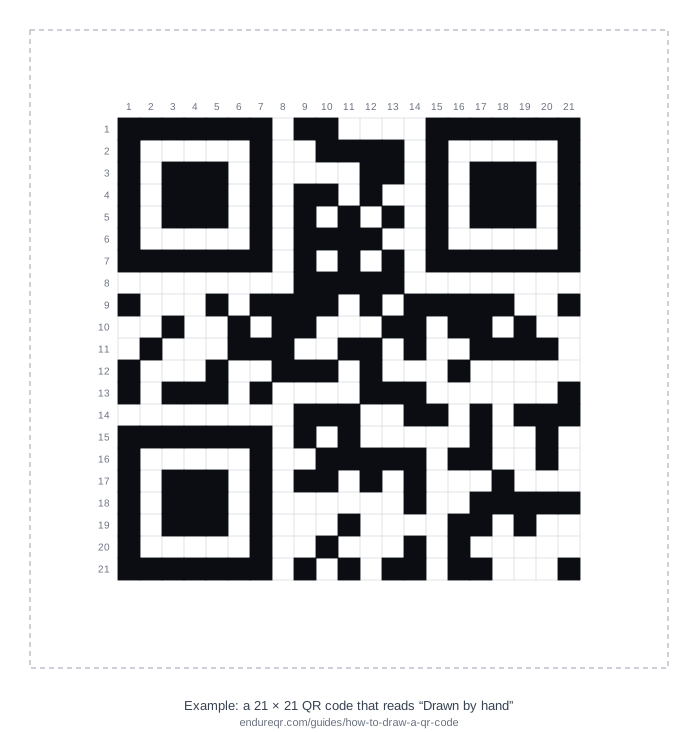
You can draw a QR code by hand, and it will scan, but you shouldn't try to work out the pattern yourself. Make a small code with a generator, then copy it square by square onto a grid. The smallest QR code is 21 × 21 squares, and our free printable grid already has 203 of those 441 squares filled in, so you only copy the rest. The whole job takes about 20 to 40 minutes.
Can you draw a QR code by hand?
Yes. A phone camera doesn't care whether the squares were printed or coloured in with a pen. It looks for three large corner squares, measures the grid between them and reads each square as dark or light. If your drawing has the right squares filled in, with enough contrast and a clear border, it scans like any other code.
What is hard is designing the pattern from scratch. The data is protected by Reed-Solomon error correction, then one of eight mask patterns is applied and scored, and the result is written into 15 bits of format information. You can do it with pen and paper, and Thonky's QR code tutorial walks through every step, but it takes hours of arithmetic and one mistake breaks the code. Copying a generated code avoids all of that.
What you need
- A small code to copy. Short text of up to 14 characters fits the smallest 21 × 21 size. The steps below show how to make one.
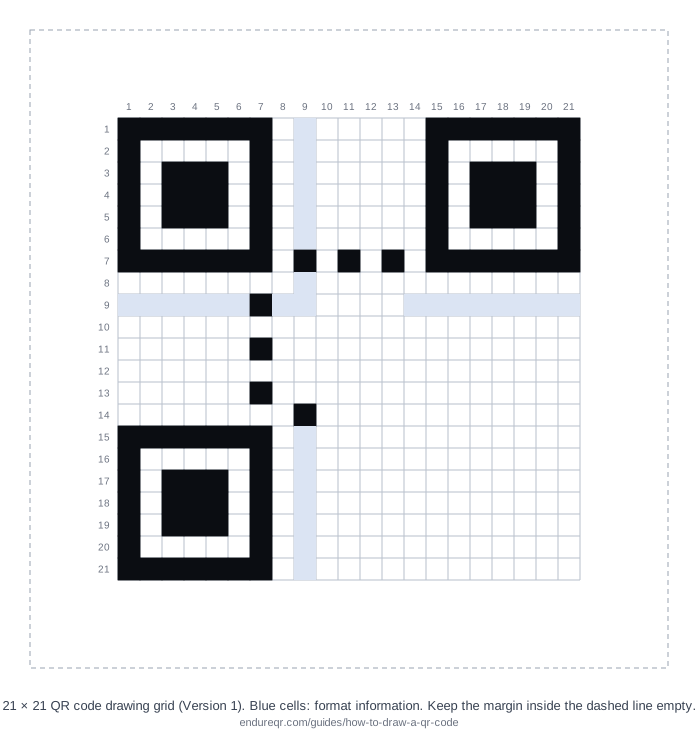
- A grid. Print our 21 × 21 drawing grid, or use graph paper. On 5 mm squares the code is about 10.5 cm wide.
- A black fine-liner or marker. Pencil and coloured pens often lack the contrast cameras need.
- A ruler, to keep your place along each row.
How to draw a QR code, step by step
- Make the code. Open the text QR code generator and type a short message, such as a name or "Table 12". Keep it to 14 characters or fewer at the default error correction.
- Make it easy to copy. Under style, choose square dots and square corners, black on white, and no logo or frame. Scan the preview to check it reads your text.
- Check the size. Count the squares along the top edge. You want 21. If you count 25 or more, shorten the text.
- Print the grid and download the code as a large PNG so you can zoom in on screen.
- Copy one row at a time. Lay the ruler under the row you're working on, read the row from left to right on screen and fill in the dark squares. Tick the row number when it's done.
- Don't skip the blue squares. They hold the format information: the error correction level and the mask. If they're wrong, scanners can't read anything else.
- Fill each square completely, right to its edges, without spilling into the next one. Leave the white margin inside the dashed line empty.
How much fits in a hand-drawn QR code?
The smallest QR code, Version 1, has 208 squares left for your data once the fixed patterns and format information are in place. That is 26 bytes, shared between your text and the error correction that lets damaged codes still scan. The more error correction you choose, the less text fits:
| Error correction | Characters in a 21 × 21 code | Damage it can recover |
|---|---|---|
| L (low) | 17 | About 7% |
| M (medium, our default) | 14 | About 15% |
| Q (quartile) | 11 | About 25% |
| H (high) | 7 | About 30% |
For hand drawing, more error correction forgives a few wobbly squares. If your text is 7 characters or fewer, choose H in the generator's style options. A web link takes more room: "https://" alone uses 8 characters, so most links need a 25 × 25 code or larger. That size adds a small 5 × 5 alignment square near the bottom-right corner. It can still be drawn; it just takes longer. The error correction guide explains the levels in more detail.
Test your drawing
Scan the finished drawing with your phone camera in good, even light, holding the phone flat above the paper. You can also take a photo and upload it to our free QR code scanner, which shows exactly what the code contains. If it doesn't scan, check these in order:
- A shifted row. The most common mistake is one row drawn a square to the left or right. Compare each row's first and last dark square with the original.
- The blue format squares. Check every one, top-left, top-right and bottom-left.
- Contrast. Go over light or patchy squares again with a darker pen.
- The border. Stray marks in the four-square quiet zone around the code confuse scanners. See why QR codes don't scan for more fixes.
Ideas for hand-drawn QR codes
- Teaching. Drawing a code is a hands-on way to show how binary data and error correction work: smudge a few squares and watch it still scan.
- Cross-stitch, mosaics and pixel art. Each square becomes one stitch, tile or block. Keep strong contrast and square shapes.
- Chalkboards and window signs. Draw at a large size with a ruler, and test from where people will stand.
- Puzzles and treasure hunts. A short hidden message makes a good clue.
A hand-drawn code is a static code: the text is in the pattern itself, so it never expires and works with no internet connection. If you just need a code to print, it's quicker to make one with the free generator and download it with no watermark.